MacSlim
Scan, tidy, clean — without learning to read a CPU graph
MacSlim is built with Rust + Tauri. It works out which caches are stale, which processes are idle and which apps are leftovers, then shows you the list with the numbers attached. One step less judgement than Activity Monitor, far more developer-aware than a generic cleaner. Every step is logged, and anything destructive asks first.
Free · No account · No telemetry · Nothing leaves your Mac
Requires macOS 13.0 or later · Apple silicon (M1 and newer)
Seven screens, everything a Mac needs
MacSlim is Chinese-first by design. Every judgement is rule-driven — it never goes online and never guesses your intent, and it always says what it is about to do.
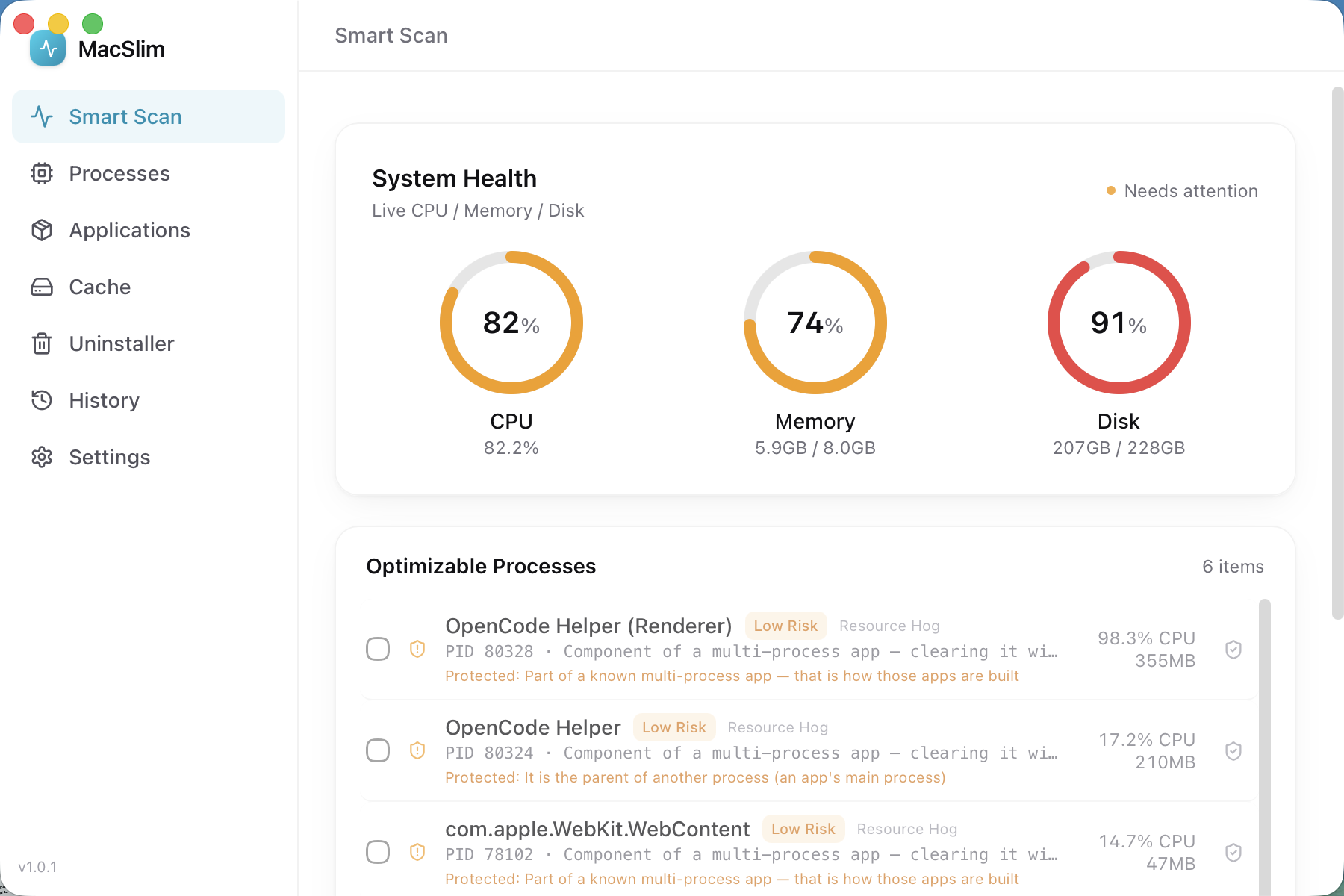
Smart scan
One click to scan system health: CPU, memory and disk as ring charts, plus a list of what can be improved — stale caches, idle processes, leftover apps — with a prominent "Optimize now" action.
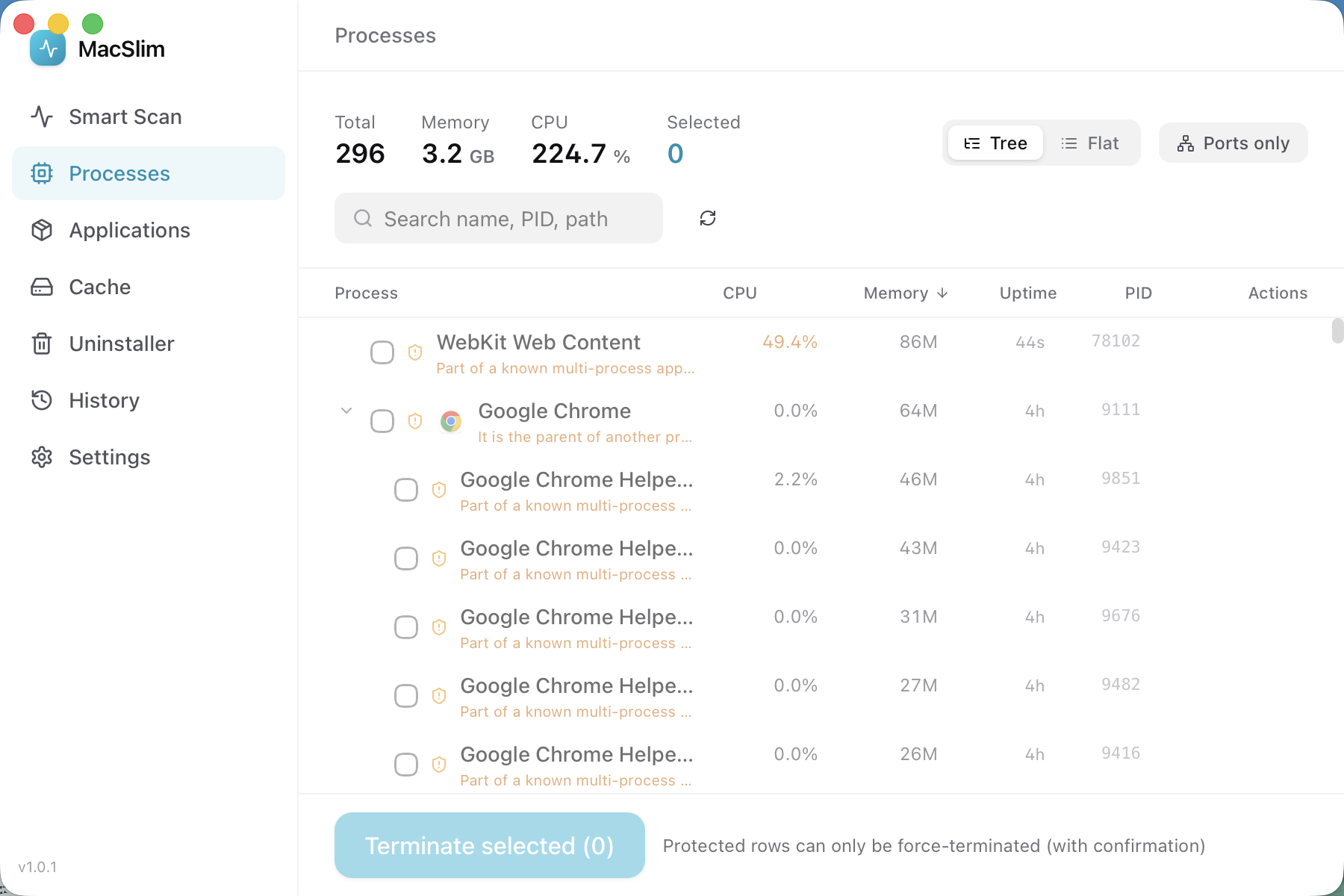
Process manager
Every running process, sortable by CPU or memory, searchable, and filterable by port usage. Protected processes and your own allowlist are clearly labelled and cannot be terminated by default.
Applications
See what is running, then quit it gracefully (equivalent to ⌘Q) or force it to quit. The interface tells you which apps are in use and what unsaved work you stand to lose.
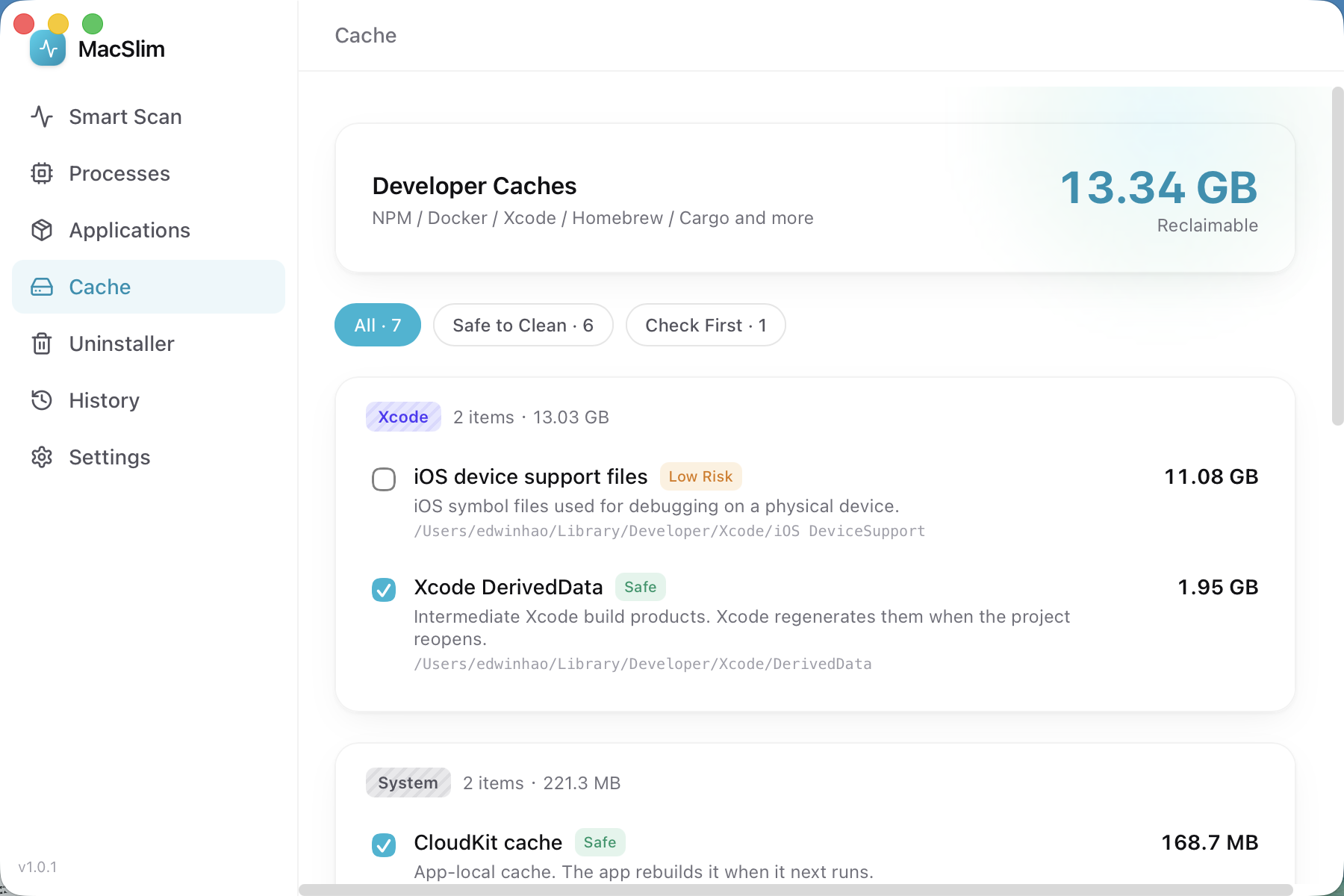
Cache cleaner
Deep support for developer caches: NPM, pnpm, Yarn, Cargo, Go, pip, Homebrew, Xcode DerivedData and Docker — plus system junk such as the Trash, crash reports, app caches and logs. Each item is labelled "safe to clean" or "check first", and you can filter by that (⌘1–3).
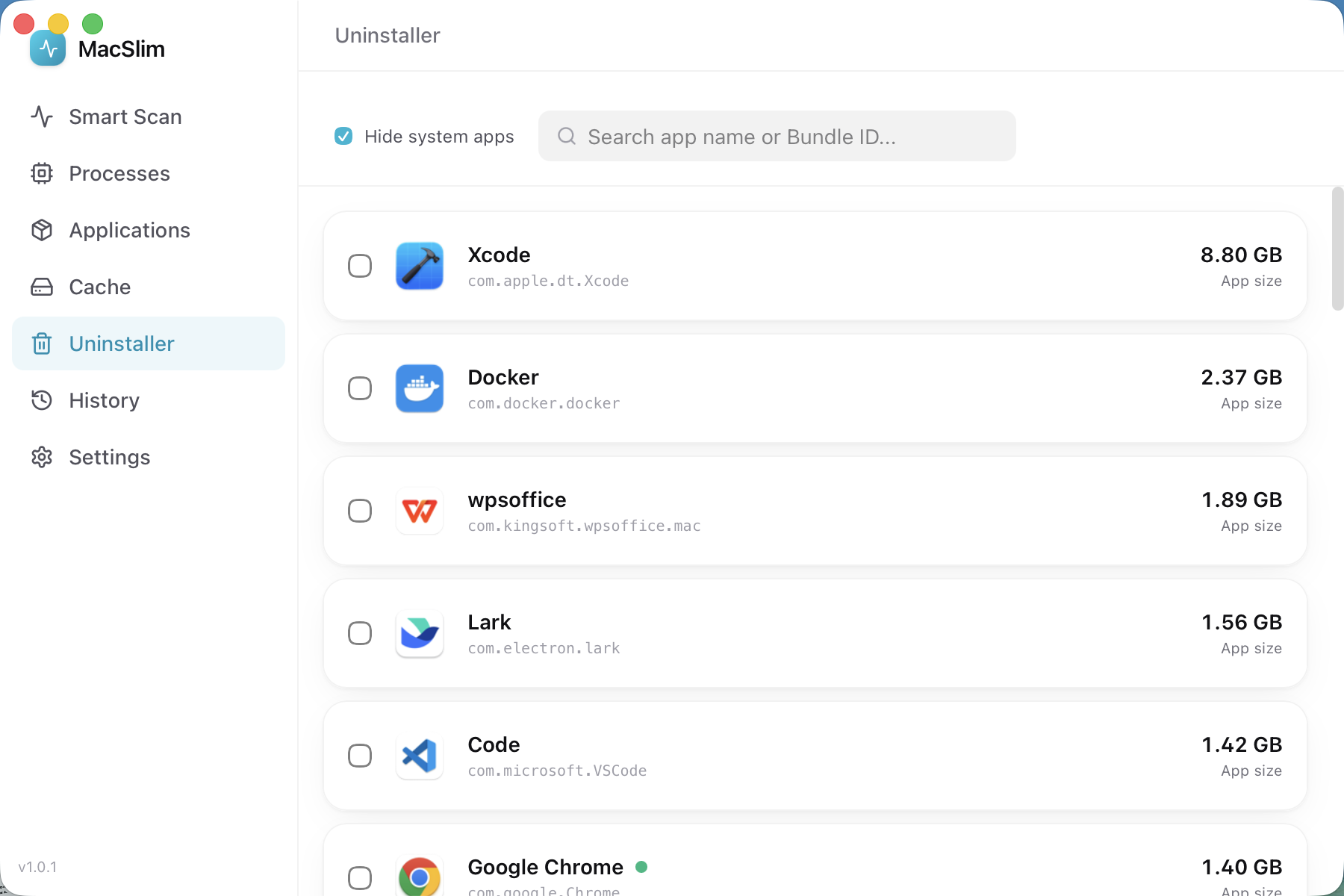
App uninstaller
Uninstall an app and MacSlim scans what it left behind — preferences, caches, containers and support files — then lists it so you decide item by item what goes.
History
Every cleanup and every terminated process is recorded: when, what, and how much space it freed. It separates measured reclaimed space from "deleted, not measured" — it never passes scanned size off as space released. You can look it up afterwards — that is what makes it controllable.
Settings
Manage your allowlist, adjust what gets scanned, and check permission status. Every setting lives on your own computer, never uploaded, never synced.
What it actually looks like
Real interface screenshots, not concept art. Switching language switches the screenshots too.
How it differs from the other cleaners
Three reasons. That is the whole list.
Simpler than Activity Monitor
Activity Monitor gives you graphs and numbers, then leaves the judgement to you. MacSlim tells you what can be cleaned and how much you get back, and does it in one click — no reading CPU curves required.
More developer-aware than generic cleaners
NPM, pnpm, Yarn, Cargo, Go, pip, Homebrew, Xcode DerivedData and Docker each get purpose-built handling. These are exactly the things a generic cleaner cannot see, let alone understand.
Fully transparent and auditable
Every step is logged. Destructive actions open a confirmation dialog stating what will happen, how much space it frees and whether it can be undone. History is always one click away.
Up and running in four steps
From download to your first cleanup usually takes under three minutes.
- 1
Download and install
Download the DMG and drag it into Applications. It is signed with a Developer ID and notarized by Apple, so Gatekeeper will not stop you.
- 2
Grant the permissions it needs
The Developer ID build needs Full Disk Access to measure and clear caches across your home folder, and it uses Apple Events to quit apps gracefully. Both can be revoked in System Settings at any time.
- 3
Scan
Open MacSlim and hit "Smart scan". Read the ring charts and the list of items, each with its size and risk level.
- 4
Confirm, then run
Tick what you want handled. The confirmation dialog shows the summary, the estimated space freed and how long the items stay valid — nothing runs until you agree.
Requirements and signing
- macOS 13.0 Ventura or later
- Apple silicon (M1 and newer)
- Signed with a Developer ID Application certificate
- Notarized by Apple
The installer is about 8.6 MB. If Gatekeeper tells you the developer is "unknown", the file did not come from the official site — download it from the button on this page.
Anything destructive asks first
MacSlim makes no "one-click undo" promise — deleted caches and stopped processes are genuinely irreversible. What it can do is finish saying everything before you click.
- Every cleanup or termination opens a confirmation dialog listing the exact targets, the estimated space freed and how long the items remain valid
- The dialog states plainly that the action cannot be undone
- By default only items costing under five minutes to re-fetch are ticked
- Expensive-to-rebuild items (full Docker images, large node_modules) are left unticked
- System-critical and SIP-protected processes are hidden by default and never listed
- Every action is written to the history log
- Results honestly separate measured reclaimed space from "deleted, not measured" — no inflated numbers
Please read the dialog before you click
This section is not legal boilerplate — it is the truth: MacSlim really does delete files and really does stop processes. Here is what that can cost you.
- •Clearing caches is irreversible: deleted packages, images and build artifacts must be re-downloaded or rebuilt
- •Terminating a process is irreversible: if you kill an app that was writing a file, unsaved work may be lost
- •Force-quitting an app is equivalent to ⌘⌥Esc — the app gets no chance to save
- •Deleting more than 10 GB at once triggers an extra confirmation
- •Suggested approach for a first run: tick only the small items you are certain about
A Mac App Store version is on the way
We are preparing a Mac App Store edition of MacSlim. It runs under the App Store sandbox permission model and focuses on developer cache cleaning and disk analysis. It is a parallel track to the Developer ID build on this page, not the same package.
- What you download here is the full-featured Developer ID build
- The App Store edition has a different permission model and a different feature emphasis
- This page will link to it once it ships
Your data never leaves your Mac
MacSlim has no server, no telemetry and no account. Every scan runs on your machine and every record is stored locally.
- No telemetry, no crash reporting, no third-party analytics SDK
- No account, no cloud sync, no remote data collection
- The privacy policy spells out exactly what it reads and what it modifies
FAQ
Is MacSlim free?
The core features are free. The installer is about 8.6 MB, with no subscription and no ads.
Will it delete my personal files?
It clears recognised caches, logs, build artifacts and the Trash. It does not go after your documents, photos or project code. That said, cache directories can contain third-party data you did not expect — so read the list in the confirmation dialog before you agree.
What permissions does it need?
The Developer ID build needs Full Disk Access to walk your home folder and measure cache sizes, and it uses Apple Events to quit apps gracefully. Both can be revoked any time in System Settings → Privacy & Security, and the rest of the app keeps working.
How is this different from Activity Monitor?
Activity Monitor is an observation tool — drawing the conclusion is left to you. MacSlim computes the cleanable list, labels the risk and does the clicking, while still making you confirm each step.
What if I clean the wrong thing?
Deleted caches and build artifacts cannot be brought back, but most of them return with a re-download or a rebuild. The history log records exactly what was removed and how much space it freed.
Does it support Intel Macs?
Not at the moment. MacSlim currently requires Apple silicon (M1 and newer) on macOS 13.0 or later.
Give this Mac a clean-up
Download the Developer ID signed build and drag it into Applications. The first scan takes under three seconds.